 CarTheme
CarPlay Widgets Not Showing on iOS 27? What to Check
If CarPlay widgets are missing, first check whether CarPlay itself is connected. A missing widget provider, a blank tile and the wrong saved design are different problems. Work through the checks below while parked; you do not need to delete all your settings as a first step.
This guide covers widgets from CarTheme’s existing catalog, including clocks, calendars, weather and photos, on iOS 27.
Match the symptom to the check
- No CarPlay interface at all: check the connection before the widgets.
- No widgets screen or Widgets setting: check the iOS version and your vehicle display’s support.
- CarTheme is not listed: update and open the app on the iPhone, then return to the selected car’s widget settings.
- A tile appears, but the design is wrong: check the saved CarTheme design assigned to that widget.
- A tile is blank or stale: open the app, check the underlying content and permissions, then save and reconnect.
1. Select the right vehicle profile
On the iPhone, open Settings → General → CarPlay → your car → Widgets. Make sure this is the car you are currently connecting to. A design saved in CarTheme does not automatically mean a widget has been added to every vehicle.
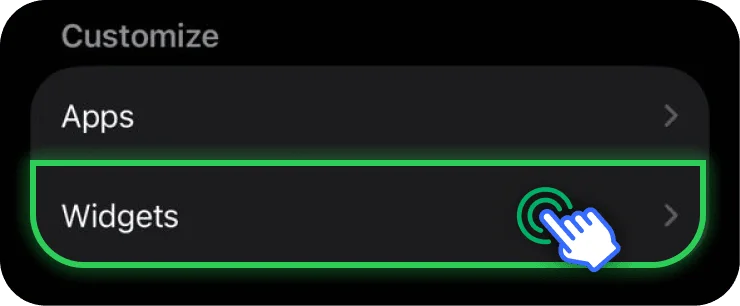
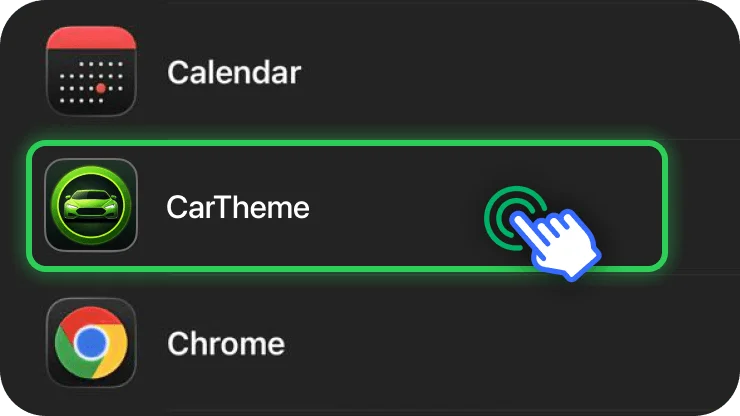
If available, check that widgets are enabled for that vehicle. Add a CarTheme widget and arrange it in a stack. The number of stacks depends on the display; adding more widgets does not enlarge the car screen. Apple’s widget guide documents these settings.
2. Open CarTheme and confirm your design is saved
Update CarTheme if an update is available, open it on the iPhone and check that the widget you want is present. Save changes before returning to the vehicle settings. After installing an app for the first time, opening it once is a useful check when its widgets are not listed.
Use a simple clock or an existing photo design as a test. If one design appears and another does not, focus on that design’s content rather than repeatedly re-pairing the car.
3. Check which design the CarTheme widget uses
The widget provider can be present while displaying the wrong saved item. In the vehicle’s widget list, use the information or configuration control for the CarTheme widget and choose the intended design.
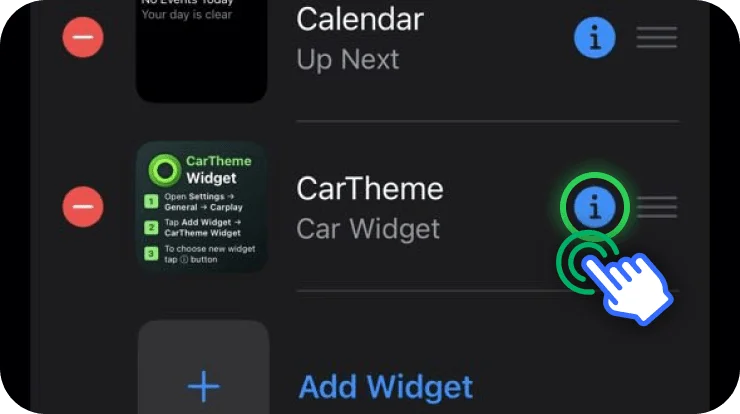
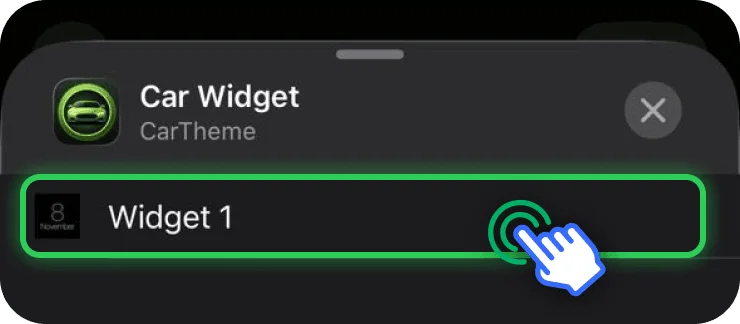
For example, if you saved a new photo but still see an older clock, check this selection before creating another widget. See the full widget setup walkthrough.
4. Investigate a blank or outdated tile
Open the relevant design in CarTheme. For a photo, check that the selected image is available. For weather or calendar content, review the permissions the app actually requests and the data shown on the iPhone. Grant only the access needed for the feature you want.
Save any corrections and reconnect to CarPlay. Widget updates are scheduled by iOS, so a tile should not be expected to refresh continuously. If one item stays blank, try re-adding just that widget after checking its content.
5. Reconnect and restart if needed
Disconnect and reconnect after saving the design. If the issue persists, restart the iPhone and the vehicle’s infotainment system using the manufacturer’s instructions. Check for iOS and vehicle software updates.
If the whole CarPlay connection fails, Apple recommends checking the cable and USB port for wired use, and Bluetooth, Wi-Fi and the CarPlay network’s Auto-Join setting for wireless use. Its connection troubleshooting guide also covers restrictions and pairing. Forgetting and re-pairing the car is a later connection step, not the first fix for a wrong photo.
Still missing? Gather the useful details
Before contacting CarTheme support, note the iPhone model, iOS version, app version, vehicle or head unit, wired or wireless connection and the exact symptom. A screenshot of the widget configuration can help; avoid including private photos or calendar details unnecessarily.
Can every car display the same number of widgets?
No. The layout depends on the vehicle display. A limited stack layout is not necessarily an installation error.
Should I reinstall the app immediately?
Start with the selected vehicle, saved design and widget configuration. Reinstallation may remove local designs, so confirm your recovery options before deleting the app.
How do I add my own photo once widgets work?
Follow how to put your own photo on CarPlay, then explore the CarTheme widget catalog.